Case study
Émolo: a Shopify B2B wholesale portal for a jewelry brand

Émolo is a handmade jewelry brand from Murcia, Spain. Its wholesale portal was built in 2026 as a separate store, on the same Prestige theme as its B2C storefront: only company buyers see prices and can buy, and they order every size of a piece from one table that stays in sync with the cart.
Project facts
- Client
- Émolo
- Sector
- Handmade jewelry
- Country
- Spain (Murcia)
- Year
- 2026
- Shopify plan
- Shopify Plus
- Base theme
- Prestige
- My role
- Through an agency
- Duration
- 4 weeks
- Team
- Me alone, on front-end
- Website
- emolo.es
What did Émolo need?
Émolo wanted to sell wholesale from Shopify without rebuilding its front-end. The portal lives in a separate, wholesale-only store, linked from the B2C one, and reuses the same Prestige theme instead of starting over. A separate store does not make the pricing problem go away: the address is public and anyone can walk in, so access still has to be decided. The portal had two requirements. First, nobody without a company account could see prices, not even in the page source. Second, a buyer had to be able to order several sizes of the same piece in one go, from the product page, from collections or from search.
How does Émolo’s B2B portal work?
The portal runs on Shopify B2B company accounts and on a custom order table that shares its state with the cart across the whole store.
Prices for company buyers only
Access is decided by a single Liquid predicate on customer.b2b?, which every price, stock badge and buy button reads. A guest or a customer without a company never receives a price in the HTML: the price is not hidden with CSS, it is never sent. Buyers can also hide their own prices on screen. That preference lives in localStorage and is applied in the head, before first paint, so the price never flashes.
A variant-by-variant order table
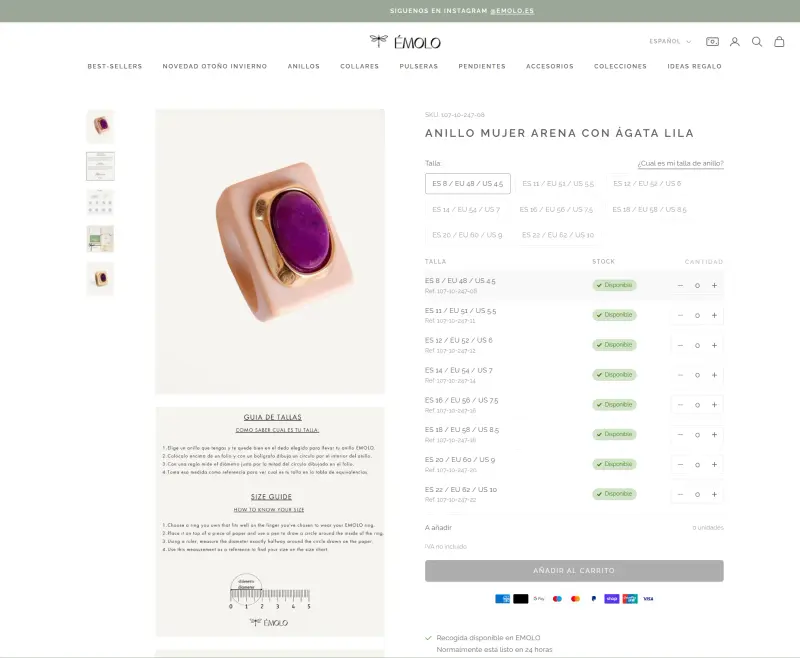
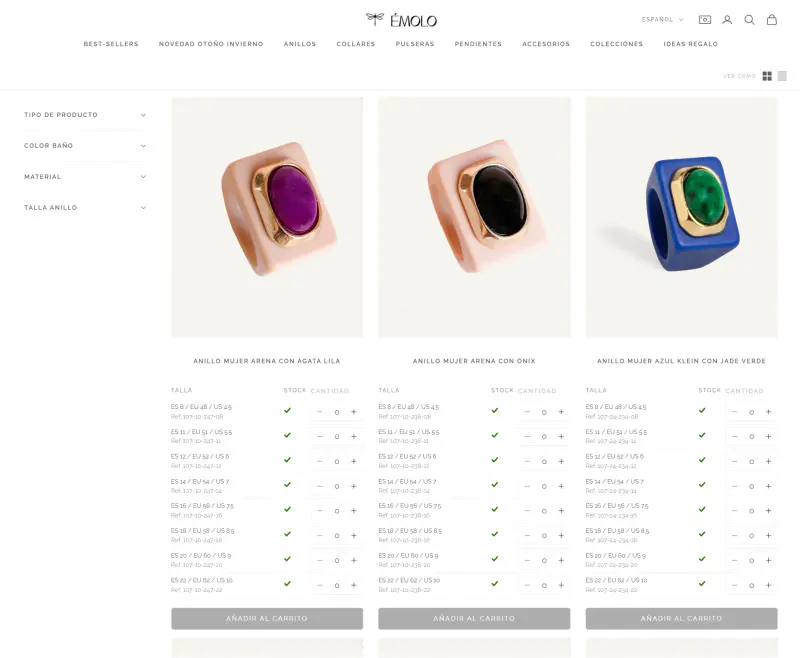
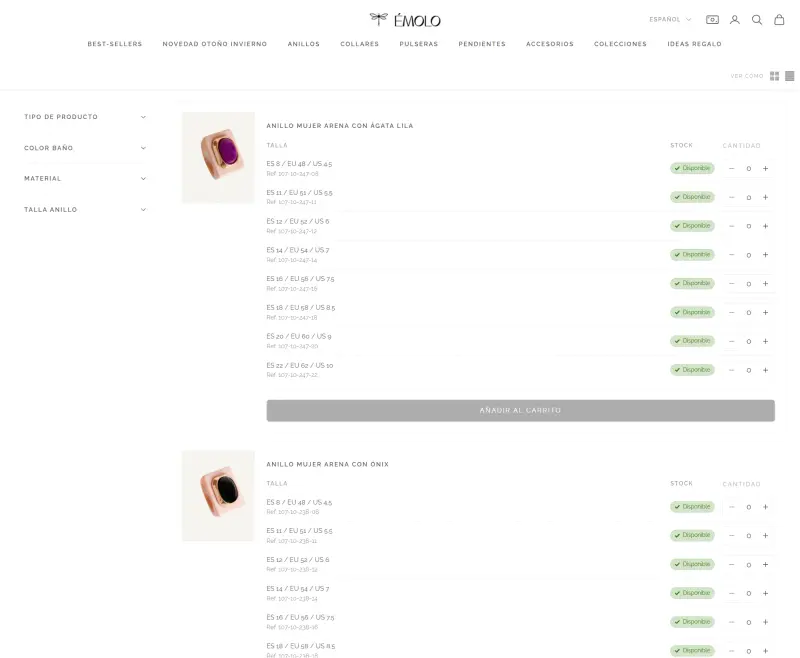
Émolo’s order table is rendered in Liquid and driven by a custom element, one row per variant with live stock. Its steppers are seeded once from /cart.js and kept in step through the theme’s cart:change event, so a variant shows the same quantity on the product page, in every collection card and in search results.
One request to /cart/update.js with absolute quantities
Submitting sends a single /cart/update.js call with absolute quantities. With that contract a first order, a top-up and a reduction are the same request, and if Shopify rejects a line the cart stays untouched instead of ending up half-updated.
Here is the pattern, rewritten from scratch so it can be published:
// Absolute quantities, not increments: the table sends the final state of each
// variant. That is why a 0 removes the line, and why a first order, a top-up and a
// correction are exactly the same request.
const updates = Object.fromEntries(
  [...table.querySelectorAll('input[data-variant-id]')].map((input) => [
    input.dataset.variantId,
    Number(input.value) || 0,
  ]),
);

const response = await fetch(`${window.Shopify.routes.root}cart/update.js`, {
  method: 'POST',
  headers: { 'Content-Type': 'application/json', Accept: 'application/json' },
  // Shopify returns the HTML of these sections already rendered: one innerHTML and
  // the cart is up to date, without asking /cart.js a second time.
  body: JSON.stringify({ updates, sections: 'cart-drawer,cart-icon-bubble' }),
});

const cart = await response.json();
if (!response.ok) throw new Error(cart.description || cart.message);

for (const [id, html] of Object.entries(cart.sections ?? {})) {
  const section = document.getElementById(`shopify-section-${id}`);
  if (section) section.innerHTML = html;
}
One request per line is the obvious alternative and it is the one that fails: forty parallel calls make the cart flash forty times and, worse, the last response can land before the first, so the total the buyer sees is not the total they have.
SKU search, views and per-variant galleries
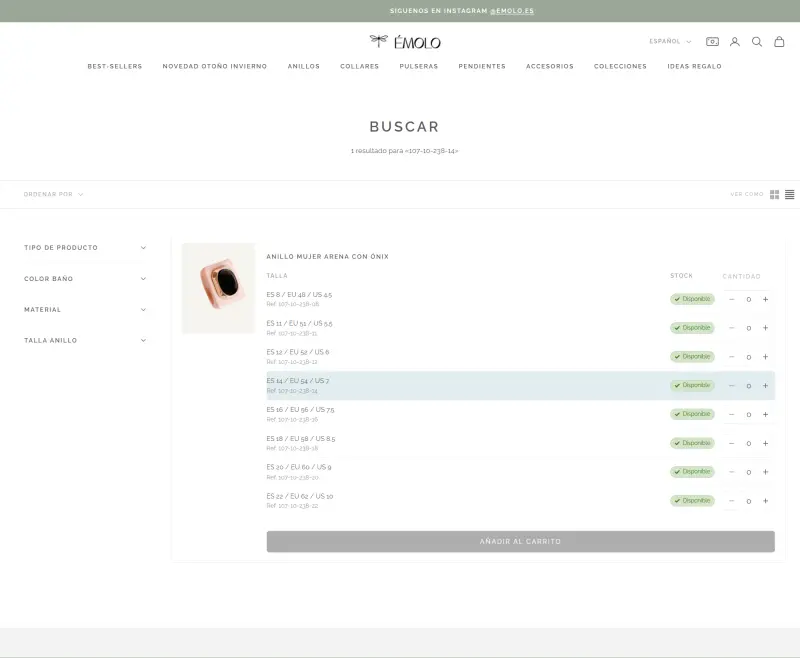
Around the table: SKU search that marks the matching row, a grid and list view switch, per-variant galleries from a metafield and stock status on each cart line. A pageshow handler re-reads the cart when the browser restores the page from the bfcache, so quantities stay correct after going back.
What is it built with?
- Shopify B2B (Companies and buyers)
- Liquid on the Prestige theme
- JavaScript custom elements
- Ajax Cart API (/cart.js and /cart/update.js)
- Metafields
Screenshots
This project is part of my work as a Shopify B2B developer.